
Best free AI tools for stock market analysis: 7 tested (2026)
- Updated 23 Aug 2026
- 21 min read
This site is the AI Reliability Tracker: we check six AI apps’ answers every month.
Every list of “free AI tools for stock research” I’ve read looks like somebody spent twenty minutes on each tool’s pricing page and never logged in. They’re pricing-table reviews dressed up as practitioner guides: “has a free tier” treated as the same thing as “useful at the free tier”, trials counted as free access, and the £2,000-a-month institutional terminals padded in so the list looks comprehensive.
So I did it the other way round. I took each tool to its actual free tier, ran a real research task on it, and wrote down what came back. Some of it was good. Some of it quietly suggested I go and pay for something else. Nobody uses one tool for everything, so the question isn’t which AI is best overall for stock research. It’s which one belongs at which stage of a session.
It's a verdict per task here, not per tool. Used together, these seven cover most of what a retail investor needs before they place a trade, and they cost nothing.
Free tiers move. Prompt caps, context limits and how many years of data you get all shift as these companies tune what they give away. The published limits here were re-checked on 23 August 2026; the linked pricing or help page is the final word.
Seven free tiers, and the one job each is good at
The best free AI tools for stock research in 2026, in the order they belong in a session:
- Perplexity Finance best free first pass on a US name (stock page, earnings hub, plain-English screener).
- Fiscal.ai my free-tier pick for structured fundamentals: five annual periods, six quarters and ten Copilot prompts a month.
- Gemini my free-tier pick for document work: up to ten files in one prompt, with rolling limits.
- Quiver Quantitative best free source for the data that isn't in the filings (congressional trades, insider activity, lobbying spend).
- StockAnalysis.com best free way to check a number an AI gave you (no login, no prompt limit, global coverage).
- Claude my free-tier pick for arguing against your own view when you bring the evidence.
- Koyfin my free terminal-style workspace for global company research.
No single one does the whole job, and none of these seven replaces your broker’s executable live options chain. Here’s the detail below: what each free tier actually includes, and where it quietly pushes you to pay.
The Bluff Filter
Enter your email to get the Bluff Filter, a free check for any AI chat.
A two-minute read. Leave whenever you like.
A seven-day trial is not a free tool
Permanent free access. That's the whole test. Several of the tools below have paid tiers that are better, and that's fine.
A 7-day trial. Any product whose "free" experience is a clock counting down to a paywall doesn't appear here.
Three times this year I’ve gone to use a “free” service and found the price tag stapled just inside the door, so this list holds a hard line. The question this post answers is what you can do without paying.
Perplexity Finance: first pass on a new name
Use it when: You’ve heard about a company and you want a structured briefing (financials, recent earnings, what analysts are saying) before you commit time to deeper research.
Why it earns its place: Perplexity Finance was the most useful opening-phase tool in this seven-product test for US-listed companies. Its Finance pages put the stock page, earnings documents and a plain-English screener in one place. Perplexity’s current Standard account is free and includes five Pro Searches a day; Research is available with a separate limited allowance.
- Live US stock pages.
- Earnings hub with documents (transcripts, filings).
- Plain-English screener for US and Indian stocks. A screener filters thousands of stocks down to the few that match what you ask for.
- Price and chart comparisons.
- Limited Pro Search and Research access on the free account.
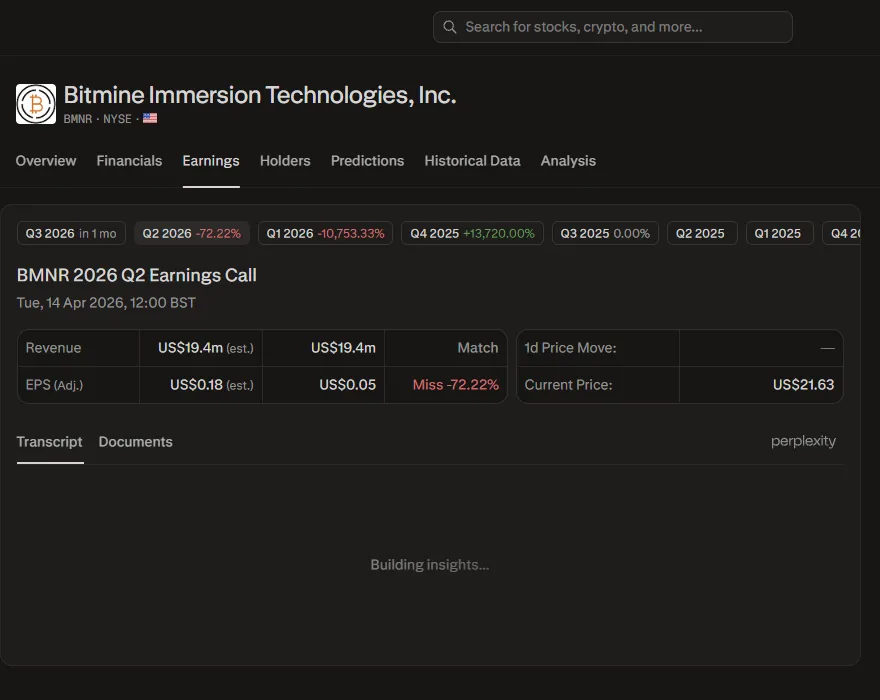
I ran the same earnings query on two stocks I follow, BMNR (a smaller US company) and META, and got two completely different tools.
The Earnings Transcript tab showed "Loading…" and never populated. The query came back with fifteen secondary sources: Yahoo Finance summaries, news aggregator paraphrases. No named analysts, no direct quotes from the calls.
Perplexity signed off by suggesting I try Seeking Alpha Premium for transcript access.
The same query returned named analyst Q&A from Morgan Stanley, Goldman Sachs and JPMorgan, with specific Zuckerberg quotes.
On top of that, a cross-call synthesis identifying a recurring evasion pattern in how management answered questions about margin trajectory.
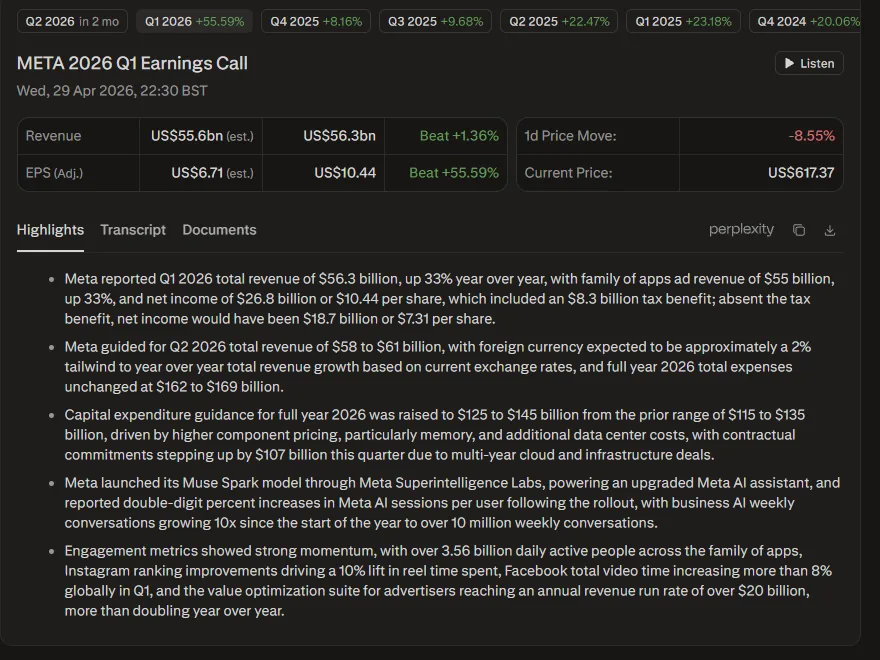
Top: BMNR. Bottom: META. Same tool, same prompt.
That’s two completely different research experiences from one tool in my captured June sessions. META had the structured earnings material; BMNR fell back to a web-search answer. Coverage can change after publication, but the lesson holds: inspect the documents the answer actually used. A web-search answer is only as good as whatever source happened to rank, and turning search on moves the error rather than removing it.
Where it fell short in my test. The smaller name did not receive the same structured earnings treatment as META. Check the document trail before trusting the polish.
And if earnings calls are the specific job you’d be hiring these tools for, I ran that comparison separately: the best AI tools for earnings analysis, tested on a real quarter’s transcripts.
Fiscal.ai (formerly FinChat): structured fundamentals
Use it when: You want to dig into the financials of a specific company (how its sales and profit margins have moved over the years) without reading the annual report (the 10-K) yourself, and without an AI inventing the numbers.
Why it earns its place: Fiscal.ai, the tool that used to be called FinChat, presents financial statements, estimates, events and Copilot queries in a structured company workspace. That is more useful than asking a general-purpose chatbot to recall a revenue number, but it is not a substitute for the filing: check any decision-driving figure against the company’s report.
- 10 AI Copilot prompts per month.
- Global stock, ETF and fund coverage.
- 5 annual periods and 6 quarters of financials.
- 3 events (calls, transcripts or slides).
- 1 dashboard with 30 rows.
Those are Fiscal.ai’s published free-plan limits on 23 August 2026. They have changed before, so check the current pricing table before building a routine around them. I saw a broker-connection option during the original test; I did not re-verify account-level availability in this refresh.
The 10-prompt monthly limit sounds generous until you use it in anger. I watched mine drain inside a single sitting.
Ten prompts is a small monthly allowance. My original session used three or four on one company; that is an observed session cost, not a fixed conversion rate. Five annual periods can show a trend, while six quarters may still miss a seasonal or economic cycle.
Where it falls short. Ten prompts go faster than you expect. Run one thorough multi-part session on a company and you've spent a third of your monthly allowance.
Gemini: document-heavy analysis
Use it when: You’ve got a long PDF (annual report, earnings release, risk factors section) and you want to dig into it directly rather than skim it.
Why it earns its place: Gemini’s free app accepts up to ten supported files in one prompt, with most non-video files capped at 100 MB. Deep Research is also available to all signed-in adult users; paid Google AI plans receive higher limits. That makes it a useful place to interrogate a filing, provided you verify the extracted figures against the document.
Here’s the honest catch, current as of 23 August 2026.
File size and useful comprehension are different limits. Google’s own help warns that large uploads can miss connections scattered through the file, so a long annual report may still work better section by section. Google publishes rolling upload-and-analysis limits rather than a dependable fixed free allowance; the app tells you when to try again.
- File upload, up to 10 files a prompt.
- Most non-video files up to 100 MB each.
- Rolling upload-and-analysis limits.
- Deep Research for signed-in adult users, with higher limits on paid plans.
- Web access.
In my test, Gemini summarised management’s framing more readily than it challenged it. The fix was in the prompt: I stopped asking Gemini to assess and started asking it to find.
"List every risk factor in section 1A that management spends less than a sentence on"
"Find every place the words 'one-off' or 'non-recurring' appear and quote the surrounding paragraph"
Either of those gets you something specific to push back on, rather than a tidied-up retelling of the company’s own story.
The other failure mode appeared in my captured outputs: a financial figure could be paraphrased close enough to look right and wrong enough to mislead. It’s one of the named ways AI gets a number wrong. I check every decision-driving number against the source document.
It states the wrong number with exactly the same composure as the right one.
Where it fell short in my test. An open-ended request echoed management's framing. A retrieval prompt and a primary-source check worked better.
Quiver Quantitative: alternative data signals
Use it when: You want signals that don’t come from the company’s own filings: what Congress members are trading, what insiders are doing, what hedge funds are building or selling, where lobbying money is going.
Why it earns its place: Quiver Quantitative organises public-disclosure datasets that sit outside a company’s own financial statements. Its public site currently exposes congressional trading, insider trading, government contracts, corporate lobbying and institutional holdings; alerts and backtesting sit in its Premium navigation. This is data collection, not an AI verdict.
- Congressional trading tracker.
- Insider transaction data.
- Government contract awards.
- Lobbying spend.
- Hedge fund and institutional holdings.
- ETF flows.
- Backtesting and real-time alerts are paid.
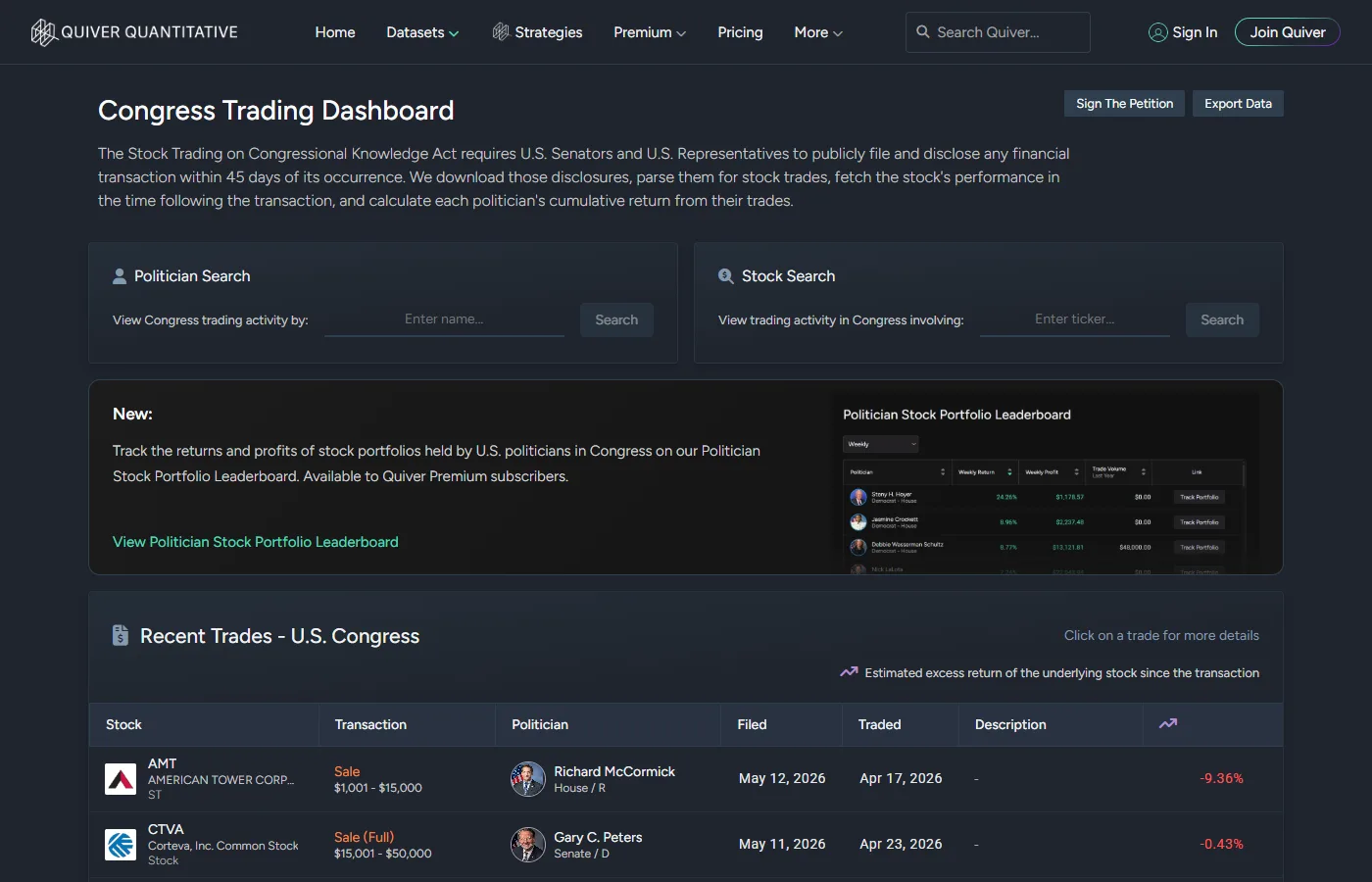
The raw disclosure data. Who bought, who sold, what was filed and when, straight from the public record rather than inferred from news.
The reading of it. The first thing I do with any entry is check the disclosure date against the trade date. A disclosure is not a live trade alert, and copying it without checking the lag changes the decision you think you're making.
It supplies the signal; you do the interpretation. Insider selling has a dozen innocent explanations: a pre-scheduled selling plan set up months earlier, tax owed on newly granted shares, a divorce. A jump in lobbying spend can be defensive or offensive.
One prominent page is Nancy Pelosi’s disclosed trading history. It records disclosures; it does not establish who made an investment decision, what information they used, or whether copying a delayed filing would reproduce a portfolio’s return. Treat it as a lead to investigate, not an accusation or a trade signal.
Where it falls short. The free tier has no alerts and no backtesting. You find out about a congressional trade when you visit the site, not when it happens. If you want to act on these signals rather than just see them, you'll need a paid plan.
StockAnalysis.com: the verification layer
Use it when: You want to check whether the financial figure an AI just gave you is correct, without an account, without a prompt limit, without another AI in the middle.
Why it earns its place: StockAnalysis.com isn’t a generative AI tool. It is the independent data tab in this AI workflow: a fundamentals database and screener you can inspect without asking another model. Its current homepage advertises 130,000+ global stocks, ETFs and funds, while the free US screener exposes thousands of listings and hundreds of filters.
- Full financial statements, ratios and historical data.
- No-login stock screener.
- IPO calendar.
- Market news digest.
- ETF data.
- Public pages are ad-supported; some advanced features are paid.
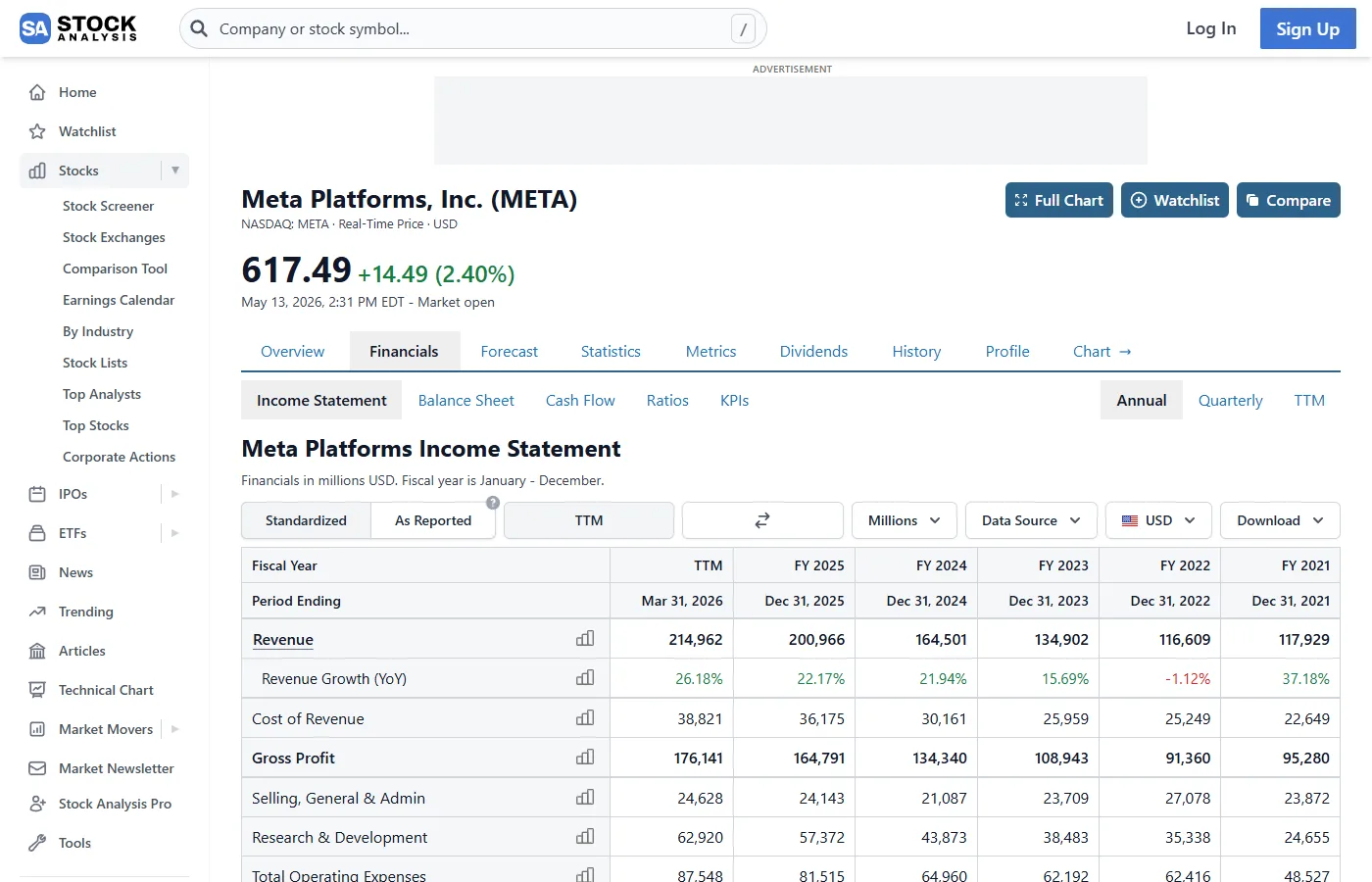
There is no chat box doing the reasoning for you. You can’t paste in a company name and ask “why is the operating margin shrinking” (why each pound of sales is turning into less profit); you’ve got to read the data yourself. For this job, that’s a feature. The tool supplies a separate record to compare with the AI’s answer.
That’s the tab I keep open in the background. When another AI tells me Company X’s revenue grew 18% last year, StockAnalysis is two clicks away and it hasn’t got an opinion to defend. It’s also the step most people skip. A sourced AI answer feels checked because it’s got a link attached, but the link doesn’t always say what the answer claims, which is a trap worth seeing for yourself.
Where it falls short. It gives you the data, not the analysis. You're using it to verify outputs, not generate them, and you need both, from different tools.
Claude: structured adversarial reasoning
Use it when: You’ve got a view on a stock and you want to stress-test it. Bear case, what-would-change-my-mind, the questions you haven’t asked.
Why it earns its place: Claude’s free tier includes web search, but search, long inputs, files and tool use all consume a limited allowance. In my test, Claude followed a multi-part adversarial prompt more usefully than an open request. That is a test result, not a permanent personality trait: the prompt and the supplied evidence do the controlling.
- Claude Sonnet 5, the free default since July 2026.
- Web search and limited file upload.
- Free usage is limited; message length, attachments, conversation length, web search and other tools all affect it.
Here’s where the Prompt Stack earns its keep, the four-part prompt I run before any trade. The free Claude tier on its own is a general assistant. The same tier with that structure turns into something that argues back properly.
- SCOPE. Work only from the figures you paste in, and say so rather than guess if a number's missing.
- FILTER. Here are the observable facts.
- RISK. Name the timing, the downside, and what would invalidate the view.
- VERDICT. One action, with a confidence level.
The six Claude prompts I run, with the real outputs they produced on MSFT, META and NVDA, show what that structure gets you in practice. Paste in your view on the stock in three sentences, paste in the real financials from StockAnalysis or Fiscal.ai, and ask Claude to argue the bear case (the case for selling) against your own framing. You’ll get something usable. Ask the same question without the structure and you’ll get a five-paragraph “on the one hand, on the other hand” essay.
The catch is that Claude doesn’t know what you don’t tell it. Paste in inference instead of numbers and you’ll get inference back, dressed up as analysis.
Where it falls short. Claude's free tier is a reasoning engine, not a research engine. You've got to bring all the facts; it applies the logic to them.
Koyfin: data terminal for international coverage
Use it when: You want a Bloomberg-style data terminal (the kind of dense single screen professionals pay thousands a year for, with charts, company metrics, the wider economic backdrop, and custom watchlists), and your watchlist isn’t all US household names.
Why it earns its place: Koyfin is the terminal-style workspace in this stack. Its current free plan combines company financials, estimates, portfolios, charting and market or macro dashboards. Koyfin’s paid comparison advertises 100,000+ global company snapshots; confirm the exact listing you need before treating that breadth as complete coverage.
- 2 years of financials and 1 year of estimates.
- Portfolios, advanced charting, and market and macro dashboards.
- 2 watchlists, 2 screens and 2 custom dashboards.
- Limited company snapshots and news.
The honest limit is data depth.
Koyfin’s current monthly table lists Plus at $39, with 10 years of financials and estimates, unlimited watchlists, screens and custom dashboards. The free plan’s two-watchlist and two-screen caps are the practical constraint for a larger research universe.
Where it fell short in my test. The free history and workspace caps are real. I also hit network errors while creating an account during the original session; that is a dated field observation, not a claim about the current signup service.
Where the list stops
The early-to-middle stages. First pass, fundamentals, document analysis, alternative data, verification, sceptical reasoning, data terminal.
Execution-grade options data. None of these seven replaces the live chain, account permissions and order ticket in your broker.
Live options chain data belongs in the broker workflow, where you can see the executable bid, ask, contract and account permissions. Structured coverage of AIM (London’s market for smaller, younger companies) and the broader UK market varies by tool and listing, so check the exact ticker before relying on a coverage claim.
The pre-trade reasoning stage (the hour between deciding a stock is interesting and placing the order) is where this list ends. Five questions to ask AI before buying any stock picks up there, with the prompts I run before any trade goes on.
Seven free tools, in the order they belong in a research session. Use this as a session template, start at the top, work down.
- Perplexity Finance - first pass on a new name: stock page, earnings hub, plain-English screener (filters thousands of stocks to the ones that match what you ask). Limit: my smaller-name test fell back to web-search sources while META received structured earnings material; inspect the document trail on each company.
- Fiscal.ai - structured fundamentals: five annual periods, six quarters, three events and 10 Copilot prompts a month on the current free plan. Limit: my original session spent three or four prompts on one company, and every decision-driving figure still needs checking against the filing.
- Gemini - document analysis: upload an annual report (the 10-K, the detailed yearly filing companies must publish) or earnings release and ask specific questions against the actual text. Limit: up to 10 files per prompt does not guarantee perfect comprehension; Google applies rolling limits and warns that large files can lose cross-document connections.
- Quiver Quantitative - alternative signals: congressional trades, insider transactions, government contract awards, lobbying spend, parsed from public disclosures, not inferred from news. Limit: no free alerts or backtesting; you see the signal when you visit, not when it happens.
- StockAnalysis.com - verification layer: public financial statements and a screener, independent of the chat that produced the answer. Use it to check whether the number an AI just gave you is correct. Limit: gives you the data, not the analysis; some advanced features are paid.
- Claude - structured adversarial reasoning: paste in your view on the stock and the real figures from StockAnalysis or Fiscal.ai, then ask Claude to argue the bear case (the case against buying) against your own framing. The Prompt Stack structure (SCOPE, FILTER, RISK, VERDICT) makes the response substantially more useful than an unstructured question. Limit: a reasoning engine, not a research engine; bring the facts, it applies the logic.
- Koyfin - terminal-style workspace: two years of financials, one year of estimates, portfolios, charting and macro dashboards. Limit: two watchlists, two screens and two custom dashboards cap how much you can track; check the exact listing you need.
Five that didn’t make it, and why
- ChatGPT free. OpenAI's current free tier does include web search, limited file uploads, data analysis and limited Deep Research. It misses this seven-stage stack because those general capabilities overlap the jobs already assigned above, not because the free product is unusable.
- Danelfin. A stock-ranking product rather than a separate research stage in this workflow. A score can be an input to investigate, but it is not the underlying evidence.
- Zen Ratings. Another rating layer. It may help generate a shortlist, but this stack reserves its seven places for gathering documents, checking figures and testing a view.
- Prospero.ai. A signal product rather than a research workspace. A performance claim from the seller is not the same thing as an independently reproducible audit.
- Robinhood Cortex Digests. An AI feature built into a UK broker's app, and the list's cautionary tale. I audited it line by line in May; by June it had vanished from my account, mobile app included, though on 8 October Robinhood's UK homepage was advertising Cortex again. The full audit is a record of what that account showed. Broker AI is the one tool category where somebody else holds the off switch.
That is the whole selection rule. The seven above were picked because they help you do your own research, not because they promise to do it for you.
For a direct head-to-head on which of these tools handles which research task best, the full comparison runs the same five prompts across ChatGPT, Claude, Perplexity, and Gemini on the same day.
Summary
The short version
What worked: Used in sequence (Perplexity for the first pass, Fiscal.ai for structured fundamentals, Gemini for documents, Quiver for alternative data, StockAnalysis to check the numbers, Claude to stress-test the view, Koyfin for a terminal-style workspace), the seven free tiers cover most of a real research session without paying for anything.
What didn’t: None of the seven replaces an executable options chain. My smaller-name Perplexity session lacked the structured earnings treatment META received. Fiscal.ai’s 10-prompt monthly cap went quickly in my test, and Koyfin’s two years of free financials may be too short for a cyclical question.
Bottom line: Tested at the free tier on real names, with the gaps stated. Coverage thins out on smaller companies and non-US stocks, and that’s the caveat to hold on to. The tools are free; the judgement still has to be yours.
These are the seven I use. Once you’ve hit the free-tier limits on two or three of them, you’ll know which one is worth paying for, and by then you’ll have run enough real sessions to make that call yourself.
And if you’re wondering how far any of these AI answers can be trusted in the first place, that question has its own page: the State of AI Reliability report grades every checkable answer this site has collected against the primary source, and keeps the score where you can audit it.
Confidently Wrong, every fortnight.
Which AI told the truth this month, with the receipts, plus an AI story worth retelling in between.
A two-minute read. Leave whenever you like.